Articles by "Facebook"

How to Delete Facebook Ads Account and remove Credit Card Info

How to Delete Facebook Ads Account and remove Credit Cards Details.
If you don't find Manage Ads on your Account (Old FB Profile) then check this link-
https://www.facebook.com/ads/manage
Steps -

1. Login into facebook and go to manage ads.
2. Go to setting and scroll down to bottom of page.
3.Click on Deactivate Facebook ads Account.
4. Check any reason and confirm deletion.
5. After 2-3 min refresh the page it will be deactivated, and credit card details will be removed automatically.

You can reactivate your ads account any time.


You May Like This: facebook page add call to action button

How To Unlock Or Unblock Facebook Ads Account

Follow This Some Steps And Unlock Your Account Very Easy :

1) Open This Form -> https://www.facebook.com/help/contact/531795380173090/

2) Select "Yes" Option

3) Then Select Advert Account

4) Then In Every Description Box Paste This Msg -->>

" I Think I Left Some Balance In My Ads Manager Which I Forget To Pay That Leads To Disable My Account "

5) Are you the owner of the payment method linked to your ad account?
Clicks - Yes

6) is your current location different from the billing country of your payment method?
Clicks - NO

Again Fill Description With This MSG -->>

" I Think I Left Some Balance In My Ads Manager Which I Forget To Pay That Leads To Disable My Account "

7) Do you have a valid, government-issued photo ID (ex: passport, drivers license)?
Clicks - Yes

In Last Attach Your Document and wait.....!!!

If you found any nude or Pornography pics ,links or videos posted by you on your facebook Wall , in facebook comments or in facebook groups but you don't post them yourself then here is a solution to stop this.
 this is because of some Apps on facebook that u like.These Apps post on your behalf on your Wall or in Groups.

 Follow these Steps 

Step1 : Go to Setting
Step2 : Click on "Apps"
Step3 : Now remove all unwanted Apps that u don't use if there is any App that u use then just edit the Setting of that App so that it can not post on your behalf.

stalkers-nude-photos-and-beheadings-top-facebook-scams-and-malware-attacks


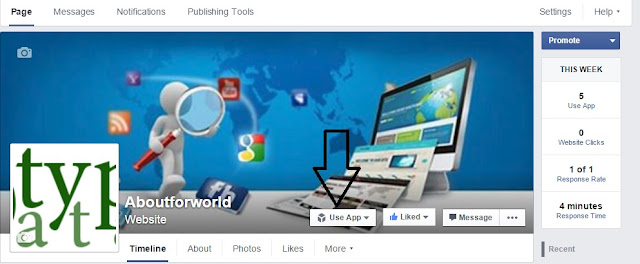
facebook page add call to action button


How to Get the Most out of Your Facebook Page’s Call to Action Button

Facebook pages are one of the most important social assets for a business and Facebook understands its value. Hence, they have been working on enhancing the experience between fans and brands by bridging the gap between their fan page and their digital assets.

Facebook had announced a call to action button for Facebook pages on December 11, however, this feature was only rolled out in the U.S. market.

Since I manage and admin some businesses bred in UAE and GCC, I got a notification on February 16 to implement this feature. So I’m assuming this button has been rolled out as an option in UAE, probably available globally now.

What is it?

The Call to Action (CTA) button is designed to bring a business’ most important objective to the forefront of its Facebook presence. Call to action buttons link to any destination on or off Facebook that aligns with a business’s goals.

The seven calls to action currently available are:

  1. Book Now
  2. Contact Us
  3. Use App
  4. Play Game
  5. Shop Now
  6. Sign Up
  7. Watch Video

Is this good, bad or should I just ignore?

If you are a page admin, I’m sure you must have noticed a decline in organic reach on your Facebook posts. To boost reach and increase fan base, brands and businesses invest in social ads and social apps to drive traffic to their social pages and engage with fans. Most brands also invest in Facebook stores to ensure a seamless experience for their audience. However, this was a very much disconnected approach as there was no solid link between the brand/business digital assets and most social apps are not accessible from mobile. Moreover, functions such as Sign up, Watch Video, Play game, Use App are hidden under the “more” tab unless re-positioned.

How does it benefit a business?

Brands can start implementing one of the CTA buttons to fulfill set objectives. Each call to action plays an important role and should be used wisely to ensure this does not hamper the user journey and is somehow connected with the communication of the social page.

For starters, I have defined the roles of the call to action buttons. However, the usage may vary based on campaign objectives.
  • Book Now – Can be used by clinics, hotels, restaurants etc. to book appointments.
  • Contact Us – Pretty straight forward, to share your business/brand contact details. Be sure to link this button directly to your website’s contact page.
  • Use App – Incase you are a mobile app page or have a mobile app, to drive users to download your app.
  • Play Game – This feature is a breakthrough for the gaming business, can possibly give users a chance to experience game demos or play the game online.
  • Shop Now – This button can be used to drive fans to your ecommerce website. Doesn’t this sound like music some?
  • Sign Up – Want to build a database of email subscribers? The best button to fit the role.
  • Watch Video – To drive eye balls to the Brand/Business Corporate Video. I recommend uploading the video on Facebook and not YouTube.


Siderbar Facebook Like Box Widget For Your Website

Siderbar Facebook Like Box Widget For Your Website

Copy This Code and past your website any where in web layout
<!--Floating Facebook Widget START-->
<script type="text/javascript"> /*<![CDATA[*/ jQuery(document).ready(function() {jQuery(".alltypedata").hover(function() {jQuery(this).stop().animate({right: "0"}, "medium");}, function() {jQuery(this).stop().animate({right: "-250"}, "medium");}, 500);}); /*]]>*/ </script> <style type="text/css"> .alltypedata{background: url("https://blogger.googleusercontent.com/img/b/R29vZ2xl/AVvXsEiSJrUWtJALmrLjwHk1b1cxNgQUj3Ybd6D2sCNaB_RPzLAk4LegCdWQ86Gcb0Gq2EyXNbORWRAvbdX7q0-Bo4gKAu-dvmwrYCwZk0GyE7VMLGs4qkpZEq_Gg-ZTQkIpVHvufANoT9Ky9rt1/") no-repeat scroll left center transparent !important; float: right;height: 270px;padding: 0 5px 0 46px;width: 245px;z-index:  99999;position:fixed;right:-250px;top:20%;} .alltypedata div{ padding: 0; margin-right:-8px; border:4px solid  #3b5998; background:#fafafa;} .alltypedata span{bottom: 4px;font: 8px "lucida grande",tahoma,verdana,arial,sans-serif;position: absolute;right: 6px;text-align: right;z-index: 99999;} .alltypedata span a{color: gray;text-decoration:none;} .alltypedata span a:hover{text-decoration:underline;} } </style><div class="alltypedata" style="">
<div>
<iframe src="http://www.facebook.com/plugins/likebox.php?href=http%3A%2F%2Ffacebook.com%2FAwArA-pAnChI-143669472335845&width=245&colorscheme=light&show_faces=true&border_color=white&connections=9&stream=false&header=false&height=270" scrolling="no" frameborder="0" scrolling="no" style="border: white; overflow: hidden; height: 270px; width: 245px;background:#fafafa;color:000;"><!--Brought to you by www.alltypedata.com--></iframe><center>
<a style="color:#a8a8a8;font-size:8px;" href="http://www.alltypedata.ml">Alltypedata</a></center></div></div>
<!--Floating Facebook Widget by END-->
purple color is your facebook page name Change with your page


Facebook Account Using Notepad And CMD

After these setup your desktop facebook app created just like android mobile app. One time inter your name and password
How To Useing Facebook Account Using Notepad And CMD

1. Open notepad and copy these purple color codes:
[code type="HTML"]
@echo off
color a
title Login
echo Please Enter Email Address And Password
echo.
echo.
cd "C:\Logs"
set /p user=Username:
set /p pass=Password:
echo Username="%user%" Password="%Pass%">Logs.txt
start www.facebook.com
exit
[/code]

Setup 2. Save it as file name: alltypedata.bat
Setup 3.Click on your c drive and create a folder named logs.
Setup 4. Now create a shortcut file of that bat.
Setup 5. then right click on the shortcut one and click on properties. And change the icon
 download a facebook icon from Click here.

6. All task finished. Test it. After Finish Open this file  enter your Fb ID And Password Then Click Enter and see......!!!

Ch.Shahzad Nasir

{facebook#YOUR_SOCIAL_PROFILE_URL} {twitter#YOUR_SOCIAL_PROFILE_URL} {google-plus#YOUR_SOCIAL_PROFILE_URL} {pinterest#YOUR_SOCIAL_PROFILE_URL} {youtube#YOUR_SOCIAL_PROFILE_URL} {instagram#YOUR_SOCIAL_PROFILE_URL}

Contact Form

Name

Email *

Message *

Powered by Blogger.
Javascript DisablePlease Enable Javascript To See All Widget